Home/Store/Glass & Accessories/Vape Batteries
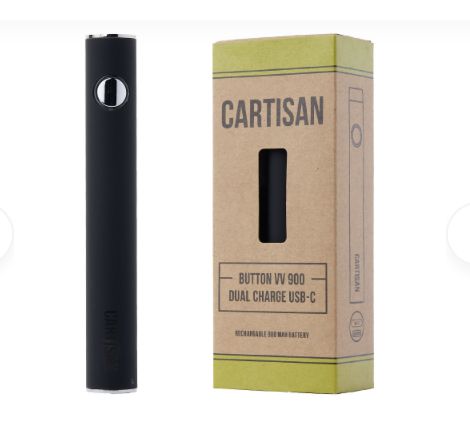
Cartisan Button VV 900 Dual Charge Vape Pen - 2G
+4
+3
+2

Cartisan Button VV 900 Dual Charge Vape Pen - 2G

$18.00
North Austin Curbside Pickup (Mon - Sat 10am-7pm)
PLEASE WAIT FOR A CONFIRMATION TEXT FROM OUR TEAM BEFORE PICKING UP YOUR ORDER! NORTH AUSTIN RETAIL & PICK-UP 2521 Rutland Dr. Austin, TX 78758 (@ Burnet Rd) Mon - Sat 10am - 7pm 512.843.7223
In stock
Cedar Park Curbside Pickup (Mon - Fri 10am-5pm
PLEASE WAIT FOR A CONFIRMATION TEXT FROM OUR TEAM BEFORE PICKING UP YOUR ORDER! CEDAR PARK WAREHOUSE / SHOWROOM Anderson Mill Road @ Volente (FM 2769) 12800 Anderson Mill Rd, Suite 100, Building A-2, Cedar Park, TX 78613 @ Volente Road / FM 2769 Pickup Mon - Fri 10am - 5pm; (CLOSED SATURDAY & SUNDAY) 512.817.4537 NOTE: Austin Retail is open 10-7 Mon through Saturday.
In stock
Save this product for later
Customer reviews
Reviews only from verified customers
No reviews yet. You can buy this product and be the first to leave a review.
Share this product with your friends
ShareSharePin it
Cartisan Button VV 900 Dual Charge Vape Pen - 2G

Cartisan Dual Charge Vape Pen

The first Cartisan battery that can conveniently be charged via USB-C or a lightning cable. 

A simple variable voltage vaporizer with 510 threading that comes in beautiful retail ready packaging. The voltage settings are easy to change by simply clicking the button 3 times. This twist battery includes a skirt adapter so it can be used with any 510 cartridge and still look great.

Battery Capacity: Built-in 900 mAh
Threading: 510
Charging: USB-C (included) or Lightning Cable
Includes Skirt Adapter: Yes
Power Method: 5 button click on/off 
Pre-Heat Funtion: 2 button click
Variable Voltage: 3 button click Variable Voltage

GREEN = 3.4V
BLUE = 3.7V
RED = 4.0V 

Includes:
1 x Cartisan Button VV 900 Dual Charge Device
1 x Type-C Charging Cable
1 x Skirt Adapter

FREQUENTLY ASKED QUESTIONS

How do I turn my battery on?

  • To turn this battery on/off click the button repeatedly 5 times

How do I charge my battery?

  • To charge this battery please use a USB-C or Lightning charger cable and plug it into a power source.

How do I change the voltage of my pen battery?

  • Click the button 3 time repeatedly to change the voltage, these batteries have three different voltage settings GREEN=3.4V BLUE=3.7V RED=4.0V

Why does my battery blink with the cartridge attached?

  • Chances are your cartridge is not making a proper connection to device. Try using a different cartridge, if your battery does not work with ANY cartridge please contact your retailer for a replacement battery. If the battery works without a cartridge, it is not a defective and will not be replaced.

How do I know if my battery is charging/charged?

  • While the battery is charging the light on the charge will be red and the light on the battery will be on. Once charging is complete, the light on the charger will turn green and the light on the battery will turn off.

This product and all products on this site are intended and sold for legal purposes only.

Show More
  • Search Products
  • My Account
  • Track Orders
  • Favorites
  • Shopping Bag
  • Gift Cards
Display prices in:USD
Skip to main content
RESTART Pick-Up | Delivery
SHOP (Curbside & Delivery)
DELIVERY-AREAS
ABOUT
CONTACT
SHIP UPS-USPS
Menu
© RESTART LLC SINCE 2018 | AUSTIN TEXAS
Terms & ConditionsPrivacy PolicyShipping & Payment InfoReturn PolicyAbout UsReport abuse